
EnsWilde IPA for iOS 26 (iPhone & iPad)

EnsWilde iOS 26 (iPhone & iPad)
Disable call recording notifications and more customizations
Download EnsWilde 2.0 IPA – Install & Use Guide
EnsWilde 2.0 is a powerful on-device iOS tool designed for advanced customization on iOS 26+ and iPadOS 26+. It allows supported system-level changes using the EnsWilde 2.0 update, non-jailbreak after a one-time setup.
If you’re looking for a safe, verified EnsWilde IPA download, a clear install tutorial, and real usage guidance, this page covers everything, step by step.
What is EnsWilde iOS 26?
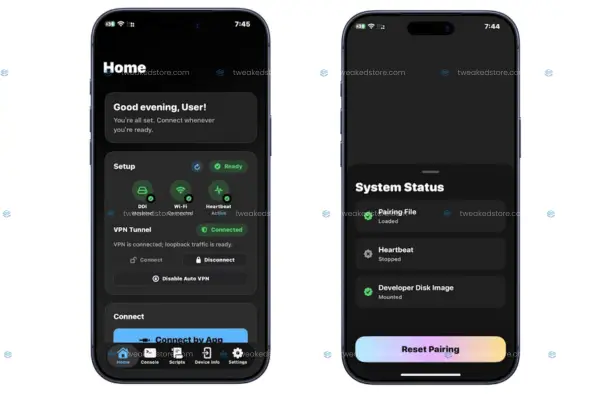
EnsWilde is a standalone iOS application built to apply specific system tweaks using the latest iOS mechanisms, such as sparserestore-style file operations and Apple service components. It runs directly on your iPhone or iPad once properly installed and configured.
It is not a jailbreak, does not install Cydia or tweak stores, and does not modify your device permanently when used correctly.
EnsWilde 2.0 – What’s New
EnsWilde version 2.0 introduces important improvements focused on stability and real-world usability:
- Refreshed, cleaner app interface
- Improved stability on iOS 26 builds
- Fixed crashes related to corrupted pairing files
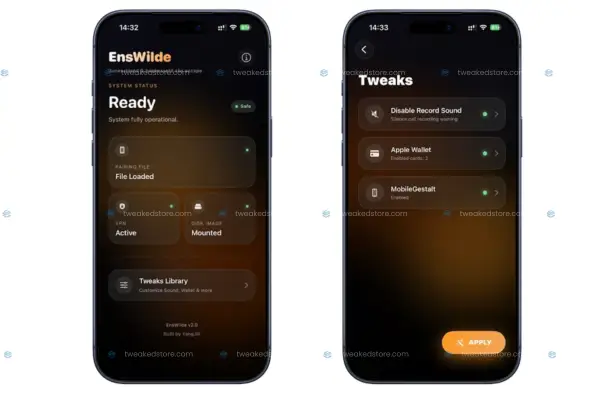
- Added MobileGestalt editing support (advanced users)
- Introduced zPatch (experimental) for deeper system interaction
EnsWilde 2.0 is designed for newer iOS 26 environments and is recommended over older builds.
EnsWilde IPA Compatibility
EnsWilde is optimized for:
- iOS 26 – iOS 26.2 b1
- iOS 18 – iOS 18.7
- All iPhone & iPad devices (iOS 18 – 26.2 beta 1)
Cercube Tweaked IPA Info:
Name: EnsWilde iOS 26
Latest Version: 2.0 (v2.0)
App Category: iOS customization tweaks
Compatibility: iOS 17+ (Up)
Size: 11.7 MB
Download EnsWilde IPA (Trusted Source)
For safety and reliability, EnsWilde 2.0 IPA is available EnsWilde official source and from TweakedStore.com (here).
Why download EnsWilde iOS 26 from TweakedStore?
- Verified, clean IPA builds
- No repackaging or injected code
- Regular updates when new EnsWilde versions are released
- Trusted by iOS customization users
👉 Download EnsWilde IPA from TweakedStore.com (recommended)
Open Cercube++ in IPA Installer
Download Cercube IPA Old Version
How to Install EnsWilde IPA on iOS 26
EnsWilde is installed using standard IPA sideloading tools.
You can install EnsWilde using:
Steb by step clean and clear guide to install EnsWilde IPA using below methods
- EnsWilde AltStore Installation
- EnsWilde SideStore Installation
- EnsWilde Sideloadly Installation
- EnsWilde Esign Installation
- Other trusted IPA installers
Required Setup (Important – Do Not Skip)
EnsWilde requires two things to function correctly:
1️⃣ Pairing File (.mobiledevicepairing)
A pairing file allows EnsWilde to access required system services.
You can:
- Generate a new pairing file using supported desktop pairing tools
- OR reuse an existing pairing file if you already have one from a previous setup
Once created:
- Transfer the .mobiledevicepairing file to your device
- Open EnsWilde and select the file inside the app
This is usually a one-time process.
2️⃣ Local VPN Profile (Required)
EnsWilde requires a local development VPN to be enabled during use.
- Install a supported local VPN app
- Enable the VPN before opening EnsWilde
- If an error appears after iOS updates, reopening the VPN app usually resolves it
This VPN does not route traffic externally. It is used only to activate required system services.
Before you start (works for all methods)
- Download EnsWilde 2.0 IPA from the official source or TweakedStore.com (trusted source).
- Make sure you have:
- Stable Wi-Fi
- Enough storage (at least 300–500 MB free)
- Your Apple ID ready (for AltStore/SideStore)
Tip: Don’t delete EnsWilde after installing. If you remove it, you may need to redo setup later.
EnsWilde AltStore Installation (Step-by-step)
On your computer
- Install AltServer on Windows/Mac.
- Connect your iPhone/iPad with a cable (first time is best).
- Open AltServer and sign in with your Apple ID.
- Install AltStore on your iPhone/iPad from AltServer.
On your iPhone/iPad
- Go to Settings → General → VPN & Device Management
- Tap your Apple ID profile → Trust
- Open AltStore → My Apps → + (Plus)
- Select the EnsWilde.ipa you downloaded
- Wait until it finishes installing
✅ Done. EnsWilde will appear on your Home Screen.
Keep in mind: AltStore apps usually require regular refreshing (re-signing) to remain functional.
EnsWilde SideStore Installation (Step-by-step)
SideStore is similar to AltStore, but it can refresh apps over Wi-Fi after setup.
On your computer
- Install SideStore using the official SideStore method (one-time setup).
- Complete the pairing setup required by SideStore.
On your iPhone/iPad
- Open SideStore
- Tap My Apps → + (Plus)
- Choose EnsWilde.ipa from Files
- Install and wait for completion
✅ Done. EnsWilde is installed.
Best practice: Use SideStore if you prefer refreshing without plugging into the computer every time.
EnsWilde Sideloadly Installation (Step-by-step)
On your computer
- Install Sideloadly (Windows/Mac).
- Connect iPhone/iPad via USB.
- Open Sideloadly.
- Drag and drop EnsWilde.ipa into Sideloadly.
- Enter your Apple ID (used for signing).
- Click Start to sideload.
On your iPhone/iPad
- Go to Settings → General → VPN & Device Management
- Trust the profile linked to your Apple ID
- Open EnsWilde
✅ Done.
Tip: If you see signing errors, try:
- updating iTunes (Windows),
- changing USB cable/port,
- restarting phone + PC.
EnsWilde Esign Installation (Step-by-step)
Esign is certificate-based. It’s popular because it can install IPAs directly on-device when you have a valid cert.
On your iPhone/iPad
- Install Esign (you must already have a working Esign setup).
- Open Esign and add your certificate + provisioning profile (if not already).
- Import EnsWilde.ipa into Esign.
- Tap Sign (or “Install” depending on your Esign version).
- Install the app.
If the app won’t open
- Go to Settings → General → VPN & Device Management
- Trust the certificate/profile.
✅ Done.
Important: If your certificate gets revoked/expired, the app may stop opening and you’ll need a new certificate.
Other trusted IPA installers 2026
Use these steps for any installer that supports importing an IPA and signing it:
- Download EnsWilde IPA (TweakedStore.com).
- Open your installer app/tool.
- Import/Select EnsWilde.ipa.
- Sign/install using:
- Apple ID method (developer free signing), or
- Certificate method (paid cert).
- Trust profile in Settings → VPN & Device Management if prompted.
- Launch EnsWilde.
✅ Done.
EnsWilde Installation troubleshooting (install issues)
1. “App won’t open”
- Trust the profile: Settings → General → VPN & Device Management
2. “Unable to install”
- Re-download the IPA
- Ensure enough storage
- Try another installer method (AltStore → Sideloadly)
3. “AltStore/SideStore says expired”
- Refresh/Re-sign the app inside AltStore/SideStore
How to Use EnsWilde 2.0 (2026)
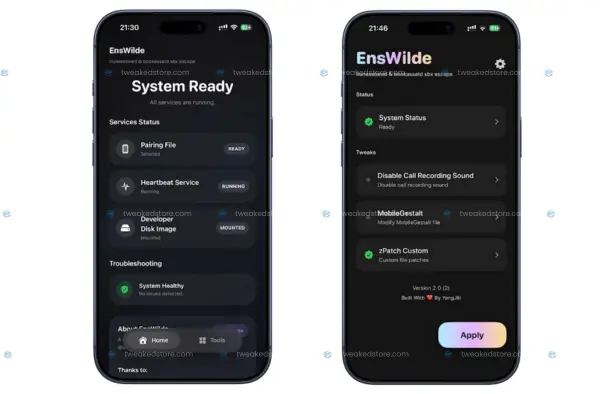
After installation and setup:
- Open EnsWilde
- Confirm pairing file is loaded
- Enable the local VPN
- Select the feature you want to use
Available features include:
🔇 Disable Call Recording Notification Sound
Removes the audible alert sound when call recording is active (use responsibly and follow local laws).
🎨 Change Apple Wallet Background
Apply a custom background image to Apple Wallet.
⚙️ Edit MobileGestalt (Advanced)
Allows modification of certain system configuration values.
Recommended only for experienced users.
🧪 zPatch (Experimental)
Optional experimental patching feature. May be unstable.
Safety Notes (Read Before Use)
- Always back up your device before using EnsWilde
- Advanced options may cause system instability if misused
- MobileGestalt editing is powerful—do not change values blindly
- EnsWilde 2.0 improves safety but does not remove all risk
Use only features you understand.
EnsWilde iOS 26 Common Issues & Fixes
1. App crashes after selecting pairing file
- Generate a fresh pairing file
- Re-select it inside EnsWilde
- Ensure you’re using EnsWilde 2.0
2. VPN enabled but EnsWilde shows errors
- Toggle VPN off and on
- Reopen the VPN app once
- Retry EnsWilde
3. Error after iOS update
- Reopen the VPN app
- Restart EnsWilde
Most issues are resolved without reinstalling the app.
EnsWilde 2.0 FAQ 2026
1. What is EnsWilde?
EnsWilde is an advanced on-device iOS tool that allows certain system-level customizations on iOS 26 / iPadOS 26 without using a traditional jailbreak. It works through modern iOS mechanisms after a one-time setup.
2. Is EnsWilde a jailbreak?
No. EnsWilde is not a jailbreak.
It does not install Cydia, does not inject tweaks globally, and does not permanently modify iOS like classic jailbreaks.
3. What does EnsWilde do?
EnsWilde allows selected system customizations, including:
- Disabling the call recording notification sound
- Changing Apple Wallet background
- Editing MobileGestalt values (advanced)
- Experimental patching features (zPatch)
Features depend on iOS version and correct setup.
4. Is EnsWilde safe to use?
EnsWilde can be safe when used correctly, but it is an advanced tool.
Important safety points:
- Always back up your device first
- Do not change settings you don’t understand
- Advanced features may cause instability if misused
EnsWilde 2.0 improves stability compared to older builds.
5. Does EnsWilde work on iOS 26?
Yes. EnsWilde 2.0 is designed for iOS 26 and iPadOS 26, including newer builds and betas. Best results are reported on iOS 26.x.
6. Does EnsWilde support iPhone and iPad?
Yes. EnsWilde works on both iPhone and iPad, as long as the device is running a supported iOS / iPadOS version.
7. How do I download EnsWilde IPA safely?
The safest option is downloading the verified EnsWilde IPA from official sources or TweakedStore.com.
This avoids modified or unsafe third-party builds.
8. How do I install EnsWilde IPA?
EnsWilde can be installed using trusted IPA installers such as:
After installation, the app must be trusted in device settings.
9. Does EnsWilde require a computer?
Yes — only once.
A computer is required to generate the pairing file during initial setup.
After that, EnsWilde runs fully on-device.
10. What is a pairing file and why does EnsWilde need it?
A .mobiledevicepairing file allows EnsWilde to communicate with required system services.
This file:
- Is created once
- Is reused unless deleted
- Must be selected inside EnsWilde
Without it, EnsWilde features will not work.
11. Do I need a VPN for EnsWilde?
Yes. EnsWilde requires a local development VPN to be enabled.
Important:
- This VPN does not route internet traffic
- It is used only to activate system services
- Turning it off may stop EnsWilde features from working
12. Why does EnsWilde show an error after an iOS update?
After major iOS updates:
- System services may reset
- The local VPN may need to be reopened
- Pairing services may need reactivation
Usually, reopening the VPN app fixes the issue.
13. Can EnsWilde disable the call recording sound?
Yes. EnsWilde includes an option to disable the call recording notification sound.
⚠️ Always follow local laws regarding call recording.
Some US states require consent from all parties.
14. Can EnsWilde change Apple Wallet appearance?
Yes. EnsWilde can change the Apple Wallet background image, depending on iOS version and correct setup.
15. What is MobileGestalt editing in EnsWilde?
MobileGestalt is an internal iOS configuration file.
EnsWilde allows advanced users to edit certain MobileGestalt values, which may affect:
- Feature availability
- System behavior
⚠️ Incorrect edits may cause system issues. Use with caution.
16. What is zPatch in EnsWilde?
zPatch is an experimental feature introduced in EnsWilde 2.0.
- It is optional
- Marked as unstable
- Intended for advanced testing
Not recommended for casual users.
17. Why does EnsWilde crash after selecting a pairing file?
Common reasons:
- Corrupted pairing file
- Old pairing file from another device
- Switching pairing files without restarting
Fix:
- Generate a fresh pairing file
- Re-select it inside EnsWilde
- Use EnsWilde 2.0 (crash fixes included)
18. Is EnsWilde permanent?
No. EnsWilde does not permanently jailbreak or unlock the device.
However:
- Changes may persist until reversed
- Some settings survive reboots
- Removing EnsWilde does not always auto-revert changes
Always document what you change.
19. Can EnsWilde brick or bootloop my device?
The risk is low but real, especially with advanced features.
To reduce risk:
- Back up before use
- Avoid random MobileGestalt edits
- Do not enable experimental features blindly
EnsWilde is for users who understand iOS customization risks.
20. Is EnsWilde legal in the United States?
EnsWilde itself is legal to download and use.
However:
- Call recording laws vary by state
- You are responsible for legal compliance
- Use features ethically and lawfully
21. Should beginners use EnsWilde?
EnsWilde is not recommended for beginners unless they follow guides carefully.
Best for:
- Advanced iOS users
- Developers
- Power users who understand system risk
22. Where should I get EnsWilde updates?
Always update EnsWilde from TweakedStore.com to ensure:
- Clean builds
- Correct version numbers
- Reduced risk of tampered IPAs